
Other platforms
Take PCI-compliant payments on phone calls without moving your telephony. This guide covers the bring-your-own-carrier pattern: keep your numbers, routing and call logic wherever they are today, and hand the caller over to Twilio <Pay> and Shuttle for the payment segment only. Cards and ACH bank debit are both supported.
It applies to any carrier, SIP trunk, PBX or contact centre platform that can transfer a call to an external SIP address. If you are on Telnyx, you do not need this pattern: Telnyx’s own <Pay> verb connects directly to Shuttle — see the Telnyx IVR integration guide.
This guide is a pointer, not a specification. It describes one approach that works. Your platform will differ, and the vendors named here change their products, APIs and consoles independently of this guide.
Shuttle does not provide technical support for Twilio, or for your carrier, PBX or contact centre platform. They are independent vendors — for transfers, SIP configuration, credentials, codecs, DTMF behaviour, recording and billing, obtain official technical support from the vendor concerned. Shuttle supports the Shuttle Pay connector and the payment itself. Verify every step against current vendor documentation and test end to end before going live.
The pattern
Section titled “The pattern”Your call stays where it is. At the point of payment you send the caller to a SIP address on your own Twilio account. Twilio asks your application what to do, you return a <Pay> verb, and Twilio captures the card by DTMF and passes it to Shuttle.
Caller | | PSTN v Your carrier / PBX / platform --- SIP INVITE ---> Twilio SIP Domain ^ | | | webhook | v | Your TwiML endpoint | | | returns <Pay> | | | v | DTMF capture | | | v | Shuttle Pay connector | | | v | Shuttle -> Gateway | | +-------------- caller returns to your flow -----------+Card data is captured inside Twilio’s PCI environment and passed to Shuttle, which charges it through your existing gateway. Your application receives the result, never the card details.
Can your platform do this?
Section titled “Can your platform do this?”Everything on the Twilio and Shuttle side is the same regardless of who carries your calls. What varies is whether your platform can hand the call over and hand it back. Check these before you plan the work.
Required
Section titled “Required”- Place an outbound call, or transfer an existing one, to an arbitrary external SIP URI. Not just to a phone number, and not just to destinations on a pre-configured trunk. Some platforms only dial E.164 numbers, which rules this pattern out.
- Respond to a SIP digest authentication challenge on that leg, or originate from static IP addresses you can give to Twilio. Twilio will not accept SIP calls to a domain with no authentication configured.
- Negotiate G.711 (PCMU or PCMA). Twilio SIP accepts G.711 and Opus. Anything else means transcoding or no audio.
- Pass DTMF as RFC 2833 / 4733 telephone-event end to end, without converting to inband audio. This is the single most common cause of failure and it fails intermittently rather than obviously.
- Stop or pause call recording mid-call. Required for the bridge flow, and for the handoff flow’s fallback path when a REFER is rejected. See the PCI section below.
Needed for some approaches
Section titled “Needed for some approaches”- Set custom SIP headers on the outbound INVITE. Convenient but not essential — see Passing the payment context for the alternative.
- Dial a dynamically constructed SIP URI, so a per-payment reference can go in the user part. If your platform can only dial one fixed destination, you will need a spoken or keyed reference instead, which is a materially worse experience.
- Send SIP REFER upstream and have your carrier honour it. Only required for the handoff flow described below. Many carriers do not honour REFER from a customer PBX.
What to ask your vendor
Section titled “What to ask your vendor”If you are not sure, these are the questions to send to your carrier or platform vendor. The answers determine which flow you can build.
- Can we transfer or dial out to an external SIP URI on a domain we do not control, at
example.sip.twilio.com? - Can we supply SIP digest credentials for that leg? If not, what source IP addresses will the INVITE originate from?
- What DTMF transport is negotiated on that leg, and can you guarantee RFC 2833 / 4733 rather than inband?
- Can we add custom
X-headers to the outbound INVITE? - Can we stop and restart call recording partway through a call, under API control?
- If we send a SIP REFER to move the call away from your platform, will you and our upstream carrier honour it?
Terminology you may encounter
Section titled “Terminology you may encounter”Platforms describe the same operation differently. When you are looking for the feature, try:
| What you want | What your platform may call it |
|---|---|
| Keep the call, send the caller to Twilio, get them back | Bridge, attended transfer, consultative transfer, conference, redirect |
| Hand the call away to Twilio entirely | Blind transfer, REFER, SIP refer, external transfer, deflection |
| Add data to the outgoing INVITE | Custom headers, X- headers, SIP headers, UUI, user-to-user |
PCI scope: read this before choosing a flow
Section titled “PCI scope: read this before choosing a flow”PCI DSS scopes any system that stores, processes or transmits cardholder data. A card number keyed on a phone keypad is cardholder data, so anything it passes through, or is recorded into, falls in scope. There is no exemption for equipment that merely passes it along.
Twilio and Shuttle each hold their own PCI DSS compliance, as will your carrier. That covers our platforms; it does not transfer to yours. Three independent things can pull your own environment into scope:
- Media path. DTMF travels in the RTP stream, either as inband audio tones or as RFC 2833 / 4733 telephone-event packets. Any SBC, PBX or media server the RTP crosses is transmitting cardholder data.
- Signalling path. DTMF can instead be carried out of band as SIP INFO messages. Where that is what gets negotiated, sitting in the signalling path is enough on its own — media bypass does not save you.
- Call recording. A recording made while the caller keys their card stores the card number. If they key a CVV, it stores sensitive authentication data, which PCI DSS prohibits retaining after authorisation under any circumstances, encrypted or not. This one catches people out because it applies even when you have successfully kept your equipment out of both paths — the recording is yours wherever it lives.
Your recording is yours to manage. Twilio’s PCI Mode protects recordings and logs on the Twilio side only. What you have to do depends on which flow you choose:
- Bridge keeps your leg alive throughout, so a running recording captures the payment. Stop it before you hand the call over and restart it when the caller returns.
- Handoff ends the leg your platform was recording, so the recording ends with it.
Two cases where handoff does not save you: if the REFER fails and your code falls back to bridging, the fallback path still needs recording stopped; and if recording happens upstream of the divert point — on your carrier’s trunk, or a compliance recorder tapping it — the call still passes through it. If you are subject to mandatory call recording, check where that recorder actually sits before assuming handoff removes the problem.
Your QSA determines your scope, not this guide. If reducing PCI scope is why you are doing this, involve them before you pick a flow.
Choose your call flow
Section titled “Choose your call flow”There are two ways to get the caller to Twilio. Which is right for you follows from the section above, not from which is easier to build.
Bridge if both of these are true:
- Either your calls are handled entirely by a cloud platform with no SBC or PBX of your own in the media or signalling path, or you already maintain a cardholder data environment and are not adopting this integration in order to reduce your PCI scope, and
- You can stop call recording for the payment segment and restart it afterwards, reliably, on every call
Handoff if any of these is true:
- You operate your own SBC, PBX or contact centre platform that the call flows through, and you are adopting DTMF capture to keep that equipment out of PCI scope
- You record calls on your platform and would rather the payment segment sit structurally outside the recording than depend on stopping and restarting it correctly every time
- Your recording obligations do not permit a gap mid-call, so stopping the recording is not available to you
Recording deserves its own line here because stopping it is a procedural control. If it fails once — a missed API call, an error swallowed, a code path nobody tested — a card number is in your archive permanently, and if the caller keyed a CVV you are holding data PCI DSS does not allow you to retain at all. Handoff makes it structural: there is no leg left to record.
Handoff needs your upstream carrier to honour SIP REFER, and many do not. Confirm before designing around it. If they will not, bridge is your only route and you will need to account for your own equipment in your scope assessment rather than assume it is excluded.
At a glance
Section titled “At a glance”| Bridge | Handoff | |
|---|---|---|
| Mechanism | Transfer or dial out, keeping your leg | SIP REFER |
| Media path during payment | Through your platform | Carrier direct to Twilio |
| Your own equipment in the card data path | Yes, if you operate an SBC or PBX | No |
| Caller returns to your flow | Automatically, when Twilio hangs up | Twilio must dial back |
| Carrier support needed | None beyond outbound SIP | Upstream carrier must honour REFER |
| Your call recording | You must stop it before handing over | Ends with the leg, but cover your fallback |
Prerequisites
Section titled “Prerequisites”- A Twilio account, upgraded (not trial)
- A Shuttle instance key and secret key
- An HTTPS endpoint you control that can return TwiML
- A platform that meets the required capabilities above
Step 1: Twilio setup
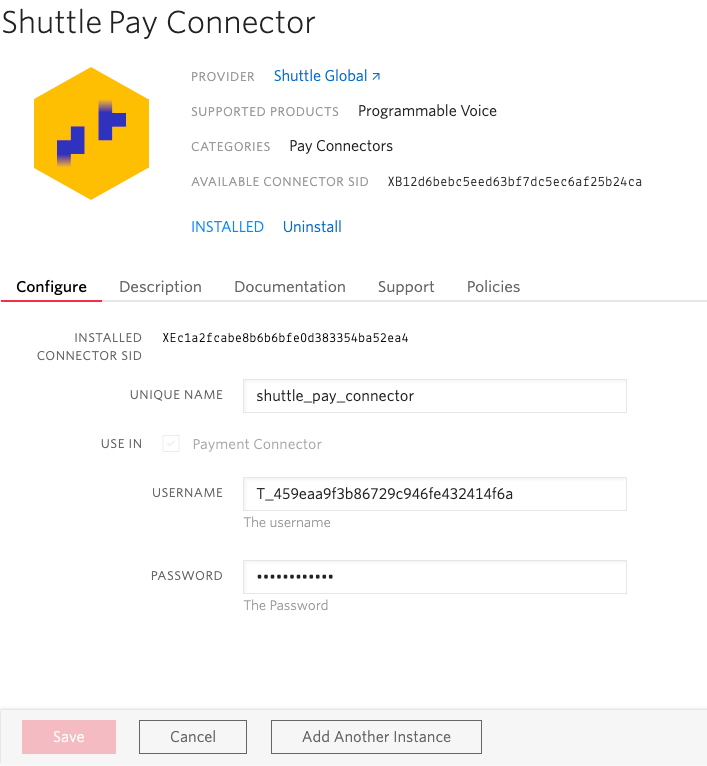
Section titled “Step 1: Twilio setup”Enable PCI Mode and install the Shuttle Pay connector
Section titled “Enable PCI Mode and install the Shuttle Pay connector”Follow step 1 of the Introduction to enable PCI Mode and install the Shuttle Pay connector.
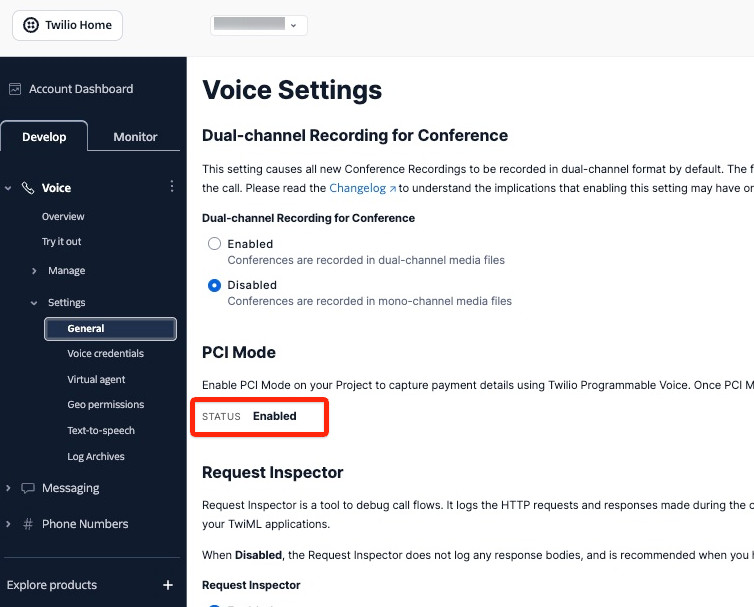
Note the connector’s Unique Name — you will reference it in the <Pay> verb.
Create a SIP Domain
Section titled “Create a SIP Domain”You do not need a Twilio phone number. A SIP Domain gives you a SIP address your platform can dial, and it points at a webhook exactly as a phone number does.
- In Twilio Console, go to Voice > Manage > SIP Domains and click Create new SIP Domain
- Set a SIP URI — for example
acme-payments.sip.twilio.com - Under Voice Configuration, set A CALL COMES IN to Webhook, enter your TwiML endpoint URL, and set the method to HTTP POST
- Set the Primary Handler Fails fallback URL to the same endpoint or a static failure handler
- Set the SIP Region closest to your callers — use Ireland (ie1) for UK and European traffic
Region matters:
<Pay>is available in the US, Ireland and Australia only. Routing UK or EU calls through a US region adds latency that degrades DTMF capture reliability.
Add voice authentication
Section titled “Add voice authentication”Twilio will not accept SIP calls to a domain with no authentication configured. Choose one:
Credential List. Twilio challenges the INVITE and your platform responds with a username and password. Preferred where your platform can supply credentials, because it survives your network addresses changing.
- Go to Voice > Manage > Credential Lists and create a list with one credential
- Return to your SIP Domain, and under Voice Authentication attach the credential list
IP Access Control List. Appropriate when the INVITE originates from static addresses you control, such as your own SBC. Less suitable when calls are placed by a cloud platform, whose egress ranges are numerous and change without notice.
Step 2: Send the call to Twilio
Section titled “Step 2: Send the call to Twilio”The mechanics are yours to build — this is the only genuinely platform-specific part of the integration. Whatever your platform calls it, you are placing an INVITE to:
sip:{reference}@acme-payments.sip.twilio.comsupplying SIP digest credentials if you configured a credential list, and optionally adding X- prefixed custom headers.
The shape is the same on any platform: a destination SIP URI, credentials, and optional headers.
If you chose bridge, stop your call recording before you transfer, and keep your own leg so the caller returns automatically.
If you chose handoff, send SIP REFER and watch for a failure response. A rejected REFER almost always means your upstream carrier does not support it — fall back to bridge rather than retrying. A successful REFER ends your leg, so your recording stops with it; your fallback path still has to stop recording explicitly.
Passing the payment context
Section titled “Passing the payment context”Your TwiML endpoint needs to know which payment this call is for. Two ways, and you may not have a choice:
Custom SIP headers. Prefix them X- — Twilio ignores headers without it. They arrive at your webhook as request parameters prefixed SipHeader_. This carries the amount and reference with the call, so your endpoint needs no lookup.
The SIP URI user part. Put a reference in the user part — sip:ORD-88231@acme-payments.sip.twilio.com — and it arrives in the To parameter. Use this when your platform cannot set custom headers, and look the payment details up from your own records. Keep the reference short and URI-safe: it crosses at least two carriers.
Verify parameter names before writing your parser. Log the full request body from one test call and confirm how Twilio names your headers. Expect
X-Amountto arrive asSipHeader_X_Amount, but confirm rather than assume.
Step 3: Serve the Pay verb
Section titled “Step 3: Serve the Pay verb”Twilio POSTs to the webhook on your SIP Domain. Return a <Pay> verb built from the context you passed:
<?xml version="1.0" encoding="UTF-8"?><Response> <Pay paymentConnector="shuttle-pay-connector" chargeAmount="42.50" currency="gbp" description="Order ORD-88231" action="https://yourapp.com/twilio/payment-result" timeout="30" maxAttempts="3"> <Parameter name="account_crm_key" value="C-991"/> <Parameter name="alt_key" value="ORD-88231"/> </Pay></Response>Two things to get right:
chargeAmountis a decimal in major units. If you hold amounts in minor units, convert — and handle zero-decimal currencies such as JPY and three-decimal currencies such as KWD.- Escape your XML. An ampersand or angle bracket in a description produces malformed TwiML and the call fails.
To capture ACH bank details instead of a card, set paymentMethod="ach-debit" on the <Pay> verb and pass the bank_account_type and AVSName parameters (see ACH-specific parameters). To tokenise without charging, omit chargeAmount.
For the full list of Shuttle <Parameter> values, see the Shuttle Pay connector reference. For <Pay> attributes and transaction types, see the Twilio IVR integration guide.
<Pay>is not your only option. Once the call is in Twilio, an agent can drive the capture through the Payments Subresource API instead, with the digits still never reaching them — see the Twilio Agent Assist integration guide. Everything up to and including the transfer is identical either way; only what you do once the call arrives changes.
If the request is missing the context you expect, return TwiML with a <Say> and <Hangup> and a 200 status. Returning an error status causes Twilio to play its own generic failure message to your caller.
Step 4: Return the call
Section titled “Step 4: Return the call”Bridge. Nothing to configure. End your TwiML with <Hangup> and the caller is back on your original leg. Restart your recording.
<?xml version="1.0" encoding="UTF-8"?><Response> <Hangup/></Response>Handoff. Dial the caller back to a SIP address on your platform:
<?xml version="1.0" encoding="UTF-8"?><Response> <Dial> <Sip>sip:return@your-platform.example.com</Sip> </Dial></Response>If that target requires authentication, <Sip> accepts username and password attributes. Prefer an unauthenticated or IP-restricted return target where your security policy allows — credentials placed in TwiML are visible in your Twilio request inspector logs, and PCI Mode redaction does not cover SIP credentials.
Step 5: Receive the result
Section titled “Step 5: Receive the result”Twilio POSTs the outcome to the action URL you set on the <Pay> verb, in the call context, before you return your closing TwiML. Shuttle’s response fields arrive prefixed PayConnector_:
| Parameter | Description |
|---|---|
Result |
Twilio’s capture outcome |
PayConnector_payment_status |
Shuttle payment status |
PayConnector_gateway_reference |
Gateway transaction ID |
PayConnector_gateway_status |
Gateway response status |
See the Shuttle Pay connector reference for the complete list and for decline types.
Shuttle also emits webhooks for the resulting payment. The action callback tells you the outcome inside the call so you can play a success or failure message; webhooks are the durable audit trail. See the Shuttle Pay connector reference for events and configuration.
Before you go live
Section titled “Before you go live”Run one real call end to end against a Shuttle sandbox instance. Use the Sandbox Gateway and its test card numbers rather than a live card: see Sandbox Gateway.
- Call recording does not capture the payment segment. Make a test payment with recording enabled on your normal flow, then retrieve the recording and confirm the DTMF tones are absent. This is the check most often skipped and the one with the largest consequence.
- DTMF survives as RFC 2833 / 4733 telephone-event across every leg. If any hop converts to inband audio, digits are misread and you will capture wrong card numbers intermittently. Test with a full 16-digit test PAN plus expiry and CVV, not a few keypresses.
- Codecs are negotiated as G.711 (PCMU or PCMA) on the leg to Twilio.
- Your payment context arrives intact — confirm the exact
SipHeader_parameter names, or theTovalue, from a logged request. - SIP authentication succeeds — check the Twilio SIP Domain logs for
401or407failures. - Your TwiML endpoint returns
200with valid XML for malformed input, not a500. - The caller returns to your flow correctly after a success, a decline, and a caller hang-up mid-capture.
- Amounts are correct for every currency you handle, including zero- and three-decimal currencies.
Troubleshooting
Section titled “Troubleshooting”| Symptom | Likely cause |
|---|---|
Call to the SIP domain rejected with 403 |
No voice authentication configured, or credentials do not match the attached credential list |
Twilio challenges with 407 and the call fails |
Your platform is not supplying SIP digest credentials on that leg |
| Webhook fires but your context is absent | Headers not prefixed X-, or stripped in transit — inspect the INVITE your platform actually sent |
| Caller hears Twilio’s generic error message | Your TwiML endpoint returned a non-200 status or invalid XML |
| Card digits captured incorrectly, or capture times out | DTMF converted to inband audio on one of the legs |
| No audio in either direction | Codec mismatch — force G.711 on the leg to Twilio |
<Pay> fails immediately with a connector error |
paymentConnector does not match the Unique Name in your Twilio console |
| SIP REFER rejected | Upstream carrier does not honour REFER — use the bridge flow |
| Payment succeeds but caller is dropped | Missing or invalid TwiML returned from the action URL |
| Card numbers appear in your call recordings | Recording was not stopped before the handover — treat as an incident, not a bug |
Where to get help. Shuttle supports the Shuttle Pay connector and the payment — declines, gateway responses, tokenisation, webhooks and the Shuttle API. If a payment fails and you have the PayConnector_gateway_reference, raise it with us.
Everything else belongs to the vendor that owns it. For call routing, transfers, SIP configuration, codecs, DTMF and recording, contact your carrier or platform vendor. For SIP Domains, <Pay>, PCI Mode and connector installation, contact Twilio support. Shuttle cannot raise or escalate tickets on your behalf with either.
References
Section titled “References”- Twilio introduction - PCI Mode and Shuttle Pay connector setup
- Twilio IVR integration guide - Full
<Pay>verb reference - Shuttle Pay connector reference - Parameters, responses, webhooks, decline types
- Sandbox Gateway - Test card numbers and sandbox setup for end-to-end testing
- Twilio: Sending SIP to Twilio - SIP Domains, authentication, custom headers
Was this page helpful?
What went wrong?
Thanks for telling us.