
Connecting Worldpay Access
Worldpay is a mature company with several gateway products. This integration supports the Worldpay Access product, which is Worldpay’s strategic platform going forward.
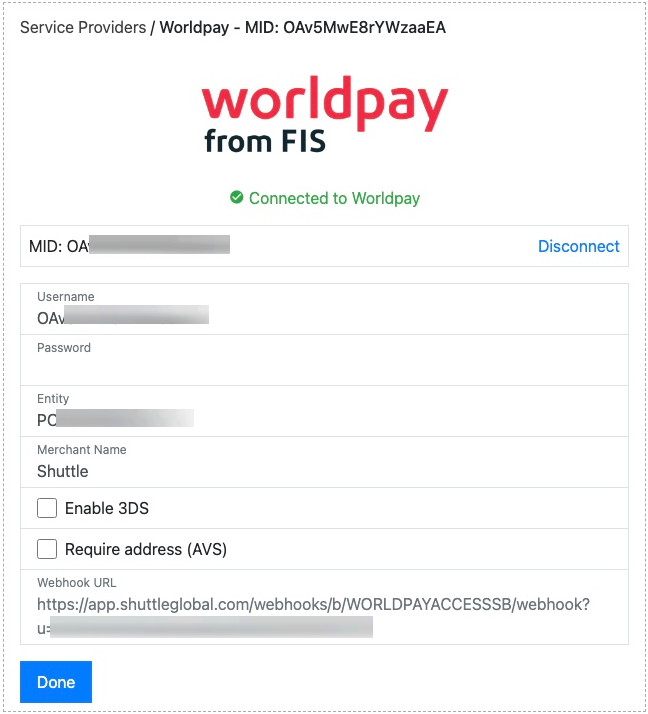
To connect to Worldpay Access you will need the following information, which you can acquire from Worldpay support:
- Username — an alphanumeric GUID
- Password — an alphanumeric GUID
- Entity
- Merchant Name
You should also set:
- Enable 3DS — to reflect whether 3DS has been enabled on your Worldpay account. This ensures the correct UX is provided for 3DS.
- Address Verification — to reflect the AVS checks enabled on your Worldpay account, so customers are asked for the right address details: Disabled (the default; no address requested), Zip Only (postcode only) or Full Address.
Once you select Save, the connection to Worldpay is tested. If successful, a green “Connected to Worldpay” message is displayed.
Once connected, you’ll be provided a webhook URL. Supply this to Worldpay support, who will configure it on your Worldpay Access account. This ensures that asynchronous payment updates from Worldpay are reflected in the platform. Copy it in full, including the query parameter string.
Was this page helpful?
What went wrong?
Thanks for telling us.