
Connecting PayU
PayU has a long history of gateway acquisition, so it offers a number of different integration types. This integration supports two of them: the REST API and the Payment Engine. Which one you use depends on the country your business operates in.
-
Payment Engine — PayU’s payment orchestration platform. Choose the Product (region) your PayU account is set up for:
- India
- South Africa (ZAR)
- Turkey
- Single Platform: any other region where PayU has asked you to use this integration method
-
REST API — for PayU accounts in Europe, such as Poland, Czechia, Hungary and Romania. It takes USD, EUR, GBP, BGN, CHF, CZK, DKK, HRK, HUF, NOK, PLN, RON, RUB, SEK and UAH.
Payment Engine
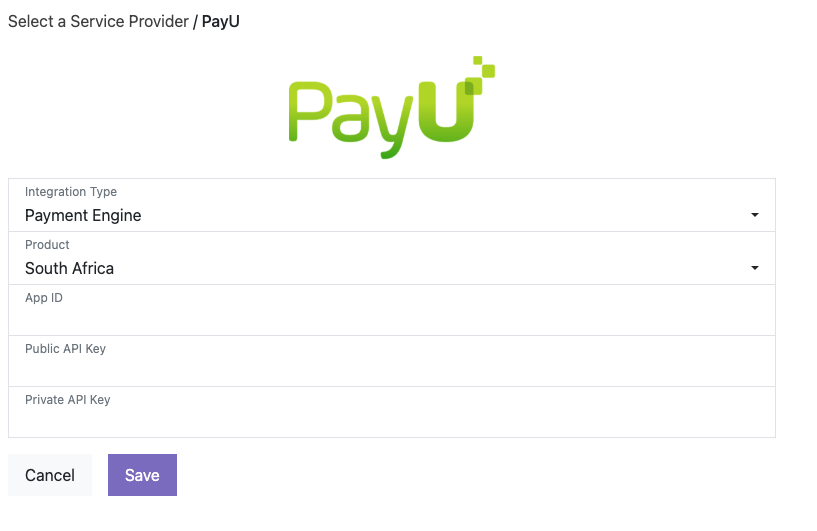
Section titled “Payment Engine”For the Payment Engine integration, set Integration Type to Payment Engine, choose your Product (region), and enter the following credentials:
- App ID
- Public API Key
- Private API Key
For the India and Single Platform products, also select the Currency of your PayU account. You can also turn on Require CVC for Saved Tokens, which asks the customer to re-enter their CVC when paying with a saved card.
Then select Save.
REST API
Section titled “REST API”For the REST API integration, set Integration Type to REST API and enter the following credentials:
- Client Id
- Client Secret
- POS Id
You can also configure:
- PayU has auto-receive enabled: Tick this if Auto-receive is enabled on your PayU POS, so payments are captured automatically. Untick it if Auto-receive is off and you manage captures yourself. This must match your PayU POS setting.
- Enable tokenization: Allows customers to save their card for future
payments. PayU must first enable multi-use tokens and zero-amount orders on your
POS: contact your PayU Account Manager.
- Require CVC for Saved Tokens: Asks the customer to re-enter their CVC when paying with a saved card.
- Complete payments that were rejected (payment has been rejected, but the buyer was charged): When PayU rejects a payment, also cancels the PayU order so that any funds PayU is holding are released.
Then select Save.
Was this page helpful?
What went wrong?
Thanks for telling us.