
Connecting Moneris
Connecting to Moneris requires a Store ID and API Token.
-
In the Moneris connection screen, enter your Store ID and API Token, set your Account Currency, and select Save.
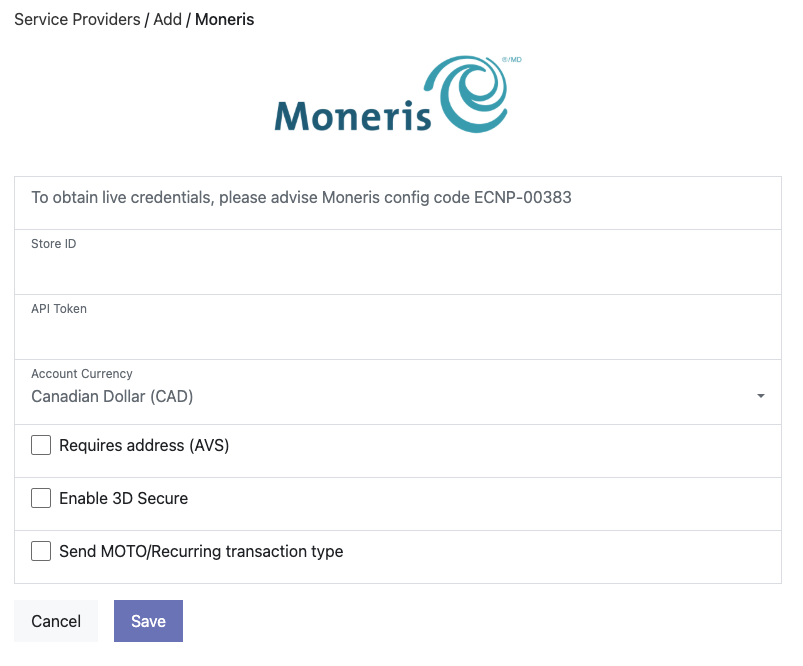
-
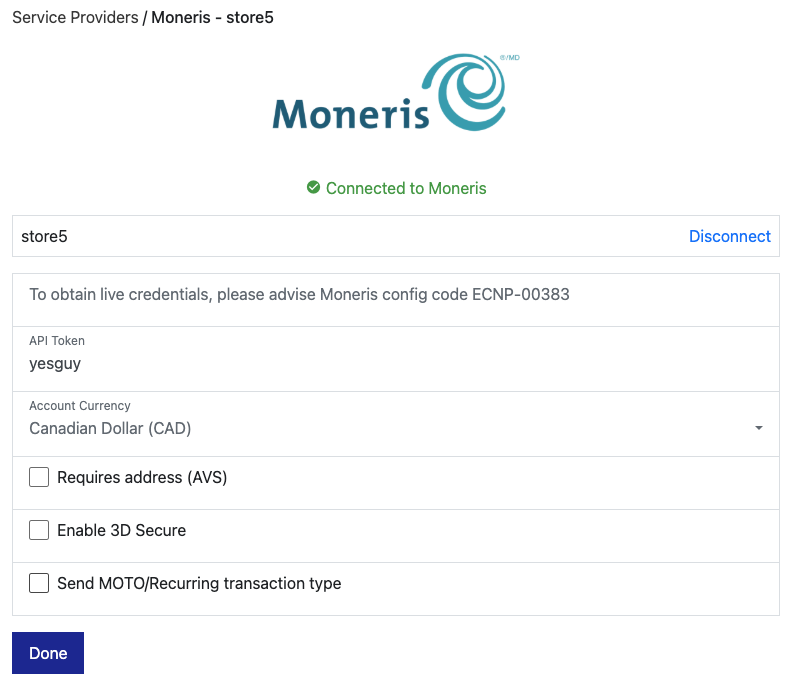
The connection is tested and you are shown a green “Connected to Moneris” message. If there is an error with the connection, check the account details are correct.
Connection options
Section titled “Connection options”Our integration with Moneris offers several options:
- Account Currency: Moneris stores are either Canadian Dollar (CAD) or United States Dollar (USD). Configure this in line with your store configuration. You will only be able to process transactions in the currency of your Store ID.
- Requires address (AVS): Requires the customer to enter their billing address.
- Enable 3D Secure: Cards that support 3DS will be required to complete 3DS for ecommerce transactions.
- Send MOTO/Recurring transaction type: Moneris requires an account to be approved for MOTO / recurring payments. This option is provided for backward compatibility. If you deselect it, all transactions are sent to Moneris as ecommerce.
- Interaction Type: Shown only where POS (PIN pad) payments are enabled for your platform.
Was this page helpful?
What went wrong?
Thanks for telling us.