
Telnyx IVR integration guide
This guide covers how to integrate Shuttle payments into your Telnyx IVR workflows using the <Pay> TeXML verb for self-service payment collection. Telnyx sends the payment details straight to the Shuttle Pay connector, so you do not need a Twilio account to take payments on Telnyx calls.
Overview
Section titled “Overview”The Telnyx <Pay> verb collects payment details during a phone call. Customers enter their card or bank details using their phone keypad in response to voice prompts, without agent involvement. Telnyx passes the details to Shuttle, which charges or tokenises them through your payment gateway. Your application receives the result, never the card details.
Telnyx implements the same pay connector contract as Twilio, so the Shuttle Pay connector reference applies, with two differences:
- Currency. Telnyx always sends USD to the connector. Pass the real currency as
<Parameter name="currency">on every charge. - Results. Telnyx does not pass Shuttle’s response back to your
actionURL. Read the result from Shuttle with the result lookup.
Prerequisites
Section titled “Prerequisites”- A Telnyx account with a TeXML application handling your calls
- A Shuttle instance key and secret key
- A payment gateway connected to your Shuttle instance
- An HTTPS endpoint you control that can return TeXML
Step 1: Create the connector
Section titled “Step 1: Create the connector”- Log into the Telnyx Portal
- In the Voice Suite, go to Programmable Voice > Payment connectors
- Select Create Connector
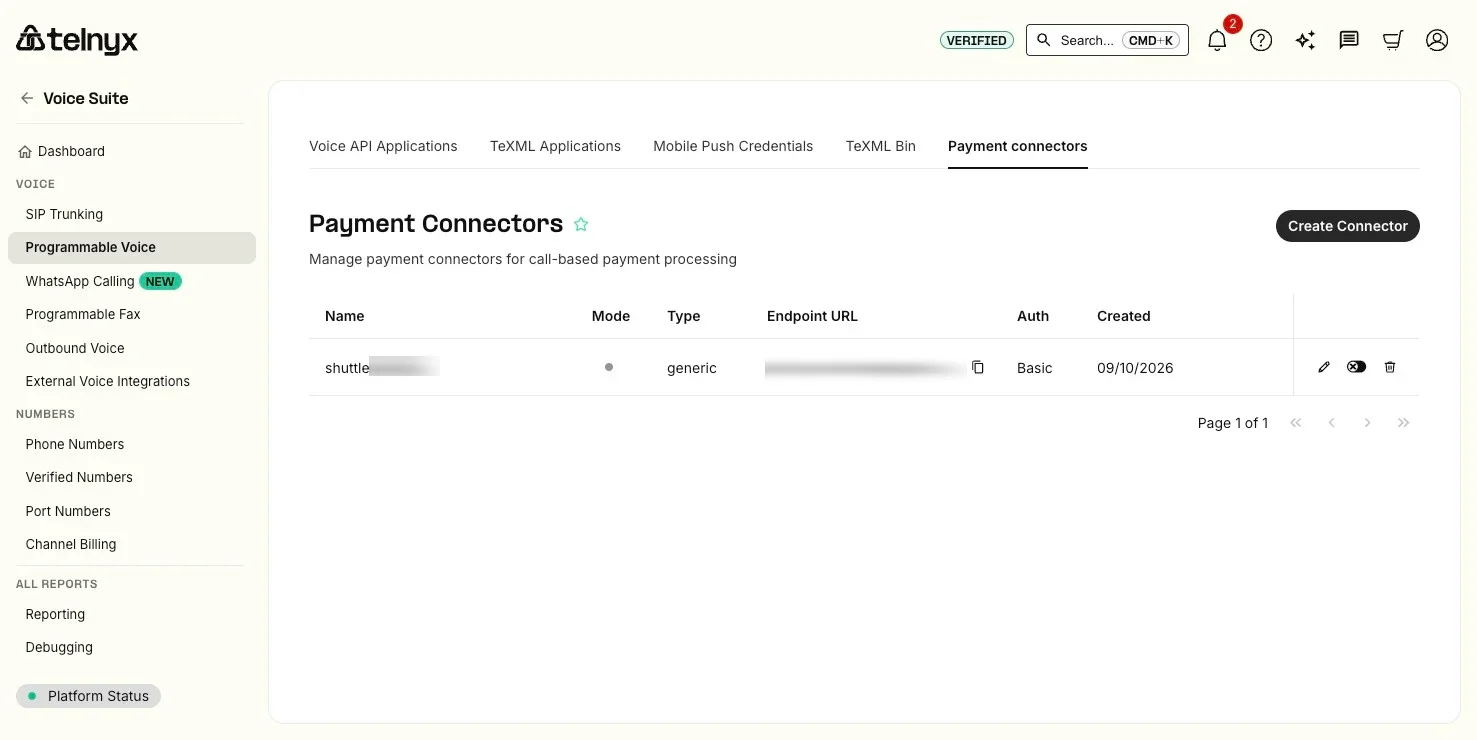
- Enter these settings:
| Field | Value |
|---|---|
| Connector name | shuttle-pay-connector (or similar - note this for later use) |
| Mode | test until you are ready to take real payments |
| Endpoint URL | https://app.shuttleglobal.com/c/api/telnyxpay |
| Authentication type | basic |
| Username | Your Shuttle instance key |
| Password | Your Shuttle secret key |
The Endpoint URL is Shuttle, not your application. Telnyx sends the collected details there and expects Shuttle’s reply. If it points at your TeXML endpoint, or the username and password are not your instance key and secret key, every payment fails with
payment-connector-errorand noPayErrorCode.
When you are ready to take real payments, switch the connector to live from the toggle in the connector list.
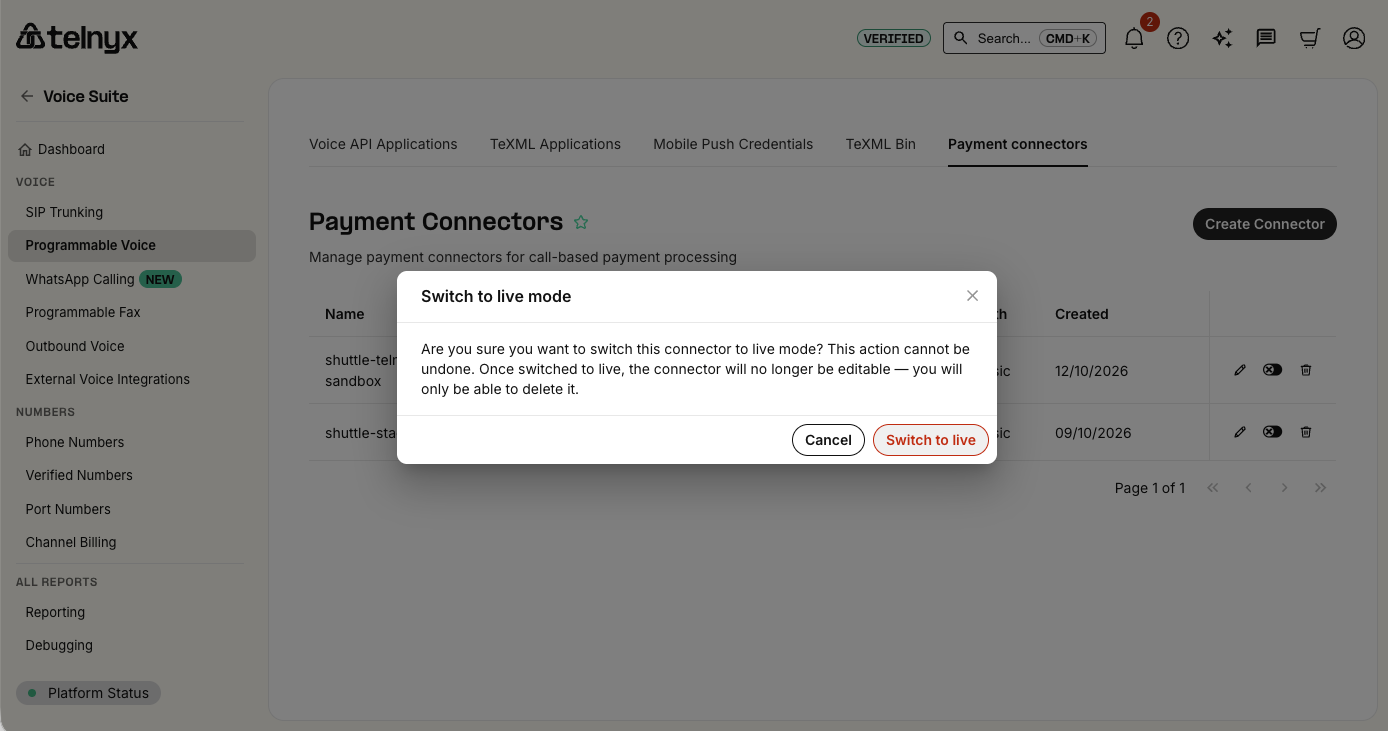
A live connector cannot be edited, and cannot be switched back to test. To change its endpoint or credentials, delete it and create it again. Test connectors can be edited.
You can also manage connectors through the Telnyx API.
Telnyx <Pay> verb
Section titled “Telnyx <Pay> verb”The <Pay> verb is added to your TeXML to collect payment details. See the Telnyx Pay documentation for the full reference.
Telnyx parameters:
| Parameter | Required | Description |
|---|---|---|
paymentConnector |
Yes | Your connector name (e.g., shuttle-pay-connector) |
action |
Yes | URL for next TeXML instructions after payment |
method |
No | POST or GET for the action request (default: POST) |
chargeAmount |
No | Amount to charge, in major units - omit for tokenisation only |
transactionType |
No | charge or tokenize (default: inferred from chargeAmount) |
paymentMethod |
No | credit-card or ach-debit (default: credit-card) |
postalCode |
No | Collect a postal code for AVS (default: true) |
timeout |
No | Seconds allowed for each entry (default: 5) - we recommend 30 |
maxAttempts |
No | Attempts allowed for each entry, 1-3 (default: 1) - we recommend 3 |
statusCallback |
No | URL for progress updates |
description |
No | Transaction description |
Set
timeout="30"andmaxAttempts="3". Telnyx’s defaults give the caller five seconds and one attempt per entry, which is too short to key a card number by hand.
Telnyx’s own currency attribute only accepts USD, so Shuttle ignores it. Use the currency parameter below instead.
Transaction types:
| Type | chargeAmount | Shuttle action |
Result |
|---|---|---|---|
| Tokenisation | Omit | - | Card saved, no charge |
| Payment (capture) | Set amount | PAYMENT |
Card charged immediately |
| Payment (auth only) | Set amount | AUTH |
Funds held, capture later |
| Payment + save card | Set amount | Include save_card=true |
Card charged and saved |
Shuttle parameters are passed as <Parameter> elements within the <Pay> verb. See the Shuttle Pay connector reference for the full list. These are the ones to get right on Telnyx:
| Parameter | Rule on Telnyx |
|---|---|
currency |
Required on every charge. The ISO currency code, e.g. USD or GBP |
bank_account_type |
Required for ACH: checking, savings or businessChecking |
AVSName |
Required for ACH: the account holder’s name |
alt_key |
Recommended on every <Pay>: your own reference, unique per attempt, used to look up the result |
ACH works as on Twilio: always pass bank_account_type and AVSName, because neither carrier collects them. Use parameter names exactly as shown: most are case-sensitive. The only exceptions on Telnyx are AVSName, currency and bank_account_type, which are matched whatever their case.
A charge without currency, or an ACH payment without its account type or holder name, is rejected with INVALID_REQUEST before it reaches your gateway.
Examples
Section titled “Examples”Card tokenisation
Section titled “Card tokenisation”Save a card for future use without charging:
<Pay paymentConnector="shuttle-pay-connector" action="https://yourapp.com/next_step" timeout="30" maxAttempts="3"> <Parameter name="alt_key" value="SAVE-12345-1"/></Pay>Standard card payment
Section titled “Standard card payment”<Pay paymentConnector="shuttle-pay-connector" action="https://yourapp.com/next_step" chargeAmount="29.99" postalCode="false" timeout="30" maxAttempts="3"> <Parameter name="currency" value="USD"/> <Parameter name="save_card" value="true"/> <Parameter name="alt_key" value="INV-12345-1"/></Pay>Pre-authorisation
Section titled “Pre-authorisation”Hold funds for later capture:
<Pay paymentConnector="shuttle-pay-connector" action="https://yourapp.com/next_step" chargeAmount="99.99" timeout="30" maxAttempts="3"> <Parameter name="currency" value="USD"/> <Parameter name="action" value="AUTH"/> <Parameter name="alt_key" value="AUTH-12345-1"/></Pay>ACH payment
Section titled “ACH payment”<Pay paymentConnector="shuttle-pay-connector" action="https://yourapp.com/next_step" chargeAmount="49.99" paymentMethod="ach-debit" timeout="30" maxAttempts="3"> <Parameter name="currency" value="USD"/> <Parameter name="bank_account_type" value="checking"/> <Parameter name="AVSName" value="John Smith"/> <Parameter name="alt_key" value="INV-12346-1"/></Pay>See ACH-specific parameters for the other bank details you can pass.
Recurring payment
Section titled “Recurring payment”<Pay paymentConnector="shuttle-pay-connector" action="https://yourapp.com/next_step" chargeAmount="19.99" timeout="30" maxAttempts="3"> <Parameter name="currency" value="USD"/> <Parameter name="frequency" value="MONTHLY"/> <Parameter name="occurrences" value="12"/> <Parameter name="start_date" value="2027-01-01T00:00:00"/> <Parameter name="alt_key" value="SUB-12345-1"/></Pay>With full traceability
Section titled “With full traceability”<Pay paymentConnector="shuttle-pay-connector" action="https://yourapp.com/payment_complete" chargeAmount="149.99" description="Premium Plan - Monthly" timeout="30" maxAttempts="3"> <Parameter name="currency" value="USD"/> <Parameter name="alt_key" value="SUB-2024-001"/> <Parameter name="account_crm_key" value="cus_123456"/> <Parameter name="account_first_name" value="Jane"/> <Parameter name="account_last_name" value="Doe"/> <Parameter name="account_email" value="jane.doe@example.com"/> <Parameter name="metadata_plan" value="premium"/> <Parameter name="metadata_billing_cycle" value="monthly"/></Pay>With billing address (AVS)
Section titled “With billing address (AVS)”Pass the cardholder’s billing address with billing_* parameters if your payment gateway performs address verification. The account_* parameters carry customer identity only - they do not include an address. See the Shuttle Pay connector reference for the full field list.
<Pay paymentConnector="shuttle-pay-connector" action="https://yourapp.com/payment_complete" chargeAmount="49.99" timeout="30" maxAttempts="3"> <Parameter name="currency" value="USD"/> <Parameter name="account_first_name" value="Jane"/> <Parameter name="account_last_name" value="Doe"/> <Parameter name="billing_line1" value="123 Main Street"/> <Parameter name="billing_line2" value="Apt 4B"/> <Parameter name="billing_line4" value="Springfield"/> <Parameter name="billing_line5" value="62704"/> <Parameter name="billing_line6" value="IL"/> <Parameter name="billing_country" value="US"/></Pay>Customising voice prompts
Section titled “Customising voice prompts”Customise the messages spoken to callers using the <Prompt> element, with the text in a nested <Say>. The for attribute names the step: payment-card-number, expiration-date, postal-code, security-code, bank-routing-number or bank-account-number. See the Telnyx Pay documentation for prompts that vary by attempt, error or card type.
<Pay paymentConnector="shuttle-pay-connector" action="https://yourapp.com/next_step" chargeAmount="29.99" timeout="30" maxAttempts="3"> <Parameter name="currency" value="USD"/> <Prompt for="payment-card-number"> <Say>Please enter your card number using your phone keypad</Say> </Prompt> <Prompt for="expiration-date"> <Say>Now enter the expiration date</Say> </Prompt> <Prompt for="security-code"> <Say>Finally, enter the three digit security code</Say> </Prompt></Pay>Handling responses
Section titled “Handling responses”Telnyx sends a request to your action URL when <Pay> completes. It reports Telnyx’s own outcome, but it does not pass Shuttle’s response through: there are no PayConnector_ fields, and on a decline Telnyx drops Shuttle’s payment ID and decline message.
Telnyx fields:
| Field | Description |
|---|---|
PayResult |
success or failed |
Result |
Detailed outcome, e.g. success, payment-connector-error, validation-error, too-many-failed-attempts, cancelled |
TransactionId |
Telnyx’s ID for this payment - use it to look up the result |
ChargeId / PaymentConfirmationCode |
Shuttle payment ID (successful charges only) |
TokenId / PaymentToken |
Shuttle payment method ID (successful tokenisations only) |
PayErrorCode |
Shuttle’s error code, when Shuttle declined or rejected the payment |
PaymentError |
Telnyx’s description of the error - connector_error when Shuttle declined it |
PaymentCardNumber |
Masked card number |
PaymentCardType |
Card brand (visa, mastercard, etc.) |
Important: Always look up the result before you tell the caller what happened.
successonly means Shuttle did not return an error: the payment can still be pending or under review.
What the outcome means:
| What you receive | Meaning | What to do |
|---|---|---|
PayResult=success |
Shuttle accepted the payment | Look up the result and check status |
Result=payment-connector-error with a PayErrorCode |
Shuttle declined or rejected the payment | Look up the result for the decline reason |
Result=payment-connector-error without a PayErrorCode |
Shuttle’s answer did not reach Telnyx in time. The payment may have succeeded | Look up the result. If it is not found yet, wait a few seconds and try again. Never treat this as a failure without checking |
Any other Result |
The caller did not complete entry, so nothing was sent to Shuttle | Offer to try again |
Looking up the result
Section titled “Looking up the result”Shuttle keeps its answer to every payment request Telnyx sends it, whether the payment succeeded or failed. Read it with the same instance key and secret key you gave the connector:
| Method | Path | Use |
|---|---|---|
GET |
/c/api/telnyxpay/{TransactionId} |
When your action URL received TransactionId |
GET |
/c/api/telnyxpay?alt_key={alt_key} |
By your own alt_key, e.g. when the action request never arrived |
curl https://app.shuttleglobal.com/c/api/telnyxpay/{TransactionId} \  -u '{instance_key}:{secret_key}'
curl "https://app.shuttleglobal.com/c/api/telnyxpay?alt_key=INV-12345-1" \  -u '{instance_key}:{secret_key}'
Response fields:
| Field | Description |
|---|---|
transaction_id |
Telnyx’s transaction ID |
alt_key |
Your alt_key, if you passed one |
connector |
telnyxpay |
request_type |
PAYMENT for a charge, TOKENISE for a tokenisation |
updated |
When Shuttle answered Telnyx |
status |
Primary status - always check this. See below |
error |
{ "code", "message" } - the decline or rejection Shuttle returned, including the gateway’s message. null if there was none |
payment |
The payment (charges only) |
contract |
The contract behind the payment (charges only) |
payment_method |
The payment method |
charge |
The first charge (recurring charges only) |
transaction |
The first transaction (recurring charges only) |
Card and bank account numbers and security codes are removed.
Status values:
status |
Meaning |
|---|---|
SUCCESS, PENDING, UNRESOLVED, DECLINED, REQAUTH |
A charge: the payment status, as in Payment status values |
ACTIVE |
A tokenisation: the card or account was saved |
INACTIVE |
A tokenisation: the card or account was not saved - see error |
ERROR |
Shuttle could not create a payment or payment method, e.g. a missing currency parameter or a gateway error - see error |
For a recurring payment that starts on a future date, status is the contract’s status until the first charge is taken.
Example: successful card payment
Section titled “Example: successful card payment”{ "transaction_id": "a1b2c3d4-5e6f-7a8b-9c0d-e1f2a3b4c5d6", "alt_key": "INV-12345-1", "connector": "telnyxpay", "request_type": "PAYMENT", "updated": "2026-10-12T14:26:53.137Z", "status": "SUCCESS", "error": null, "payment": { "id": "pay_20648_10045", "status": "SUCCESS", "gateway_status": "APPROVED", ... }, "contract": { "id": "co_20648_10045", "status": "COMPLETED", ... }, "payment_method": { "id": "pm_20648_10045", "status": "SINGLEUSE", ... }}The payment method is SINGLEUSE because the card was not saved. With save_card=true it is ACTIVE.
Example: declined card payment
Section titled “Example: declined card payment”{ "transaction_id": "b2c3d4e5-6f7a-8b9c-0d1e-f2a3b4c5d6e7", "alt_key": "INV-12345-2", "connector": "telnyxpay", "request_type": "PAYMENT", "updated": "2026-10-12T14:31:08.512Z", "status": "DECLINED", "error": { "code": "DECLINED", "message": "Invalid CVC" }, "payment": { "id": "pay_20648_10046", "status": "DECLINED", "gateway_status": "DECLINED", "gateway_message": "Invalid CVC", ... }, "contract": { "id": "co_20648_10046", ... }, "payment_method": { "id": "pm_20648_10046", ... }}Example: successful tokenisation
Section titled “Example: successful tokenisation”{ "transaction_id": "c3d4e5f6-7a8b-9c0d-1e2f-a3b4c5d6e7f8", "alt_key": "SAVE-12345-1", "connector": "telnyxpay", "request_type": "TOKENISE", "updated": "2026-10-12T14:35:41.008Z", "status": "ACTIVE", "error": null, "payment_method": { "id": "pm_20648_10047", "status": "ACTIVE", ... }}Errors:
| Status | Meaning |
|---|---|
404 |
No result found. Nothing reached Shuttle for that ID, it is more than 24 hours old, or Shuttle is still processing the payment - try again after a few seconds |
401 |
The credentials do not belong to the instance that took the payment |
400 |
Neither a transaction ID nor an alt_key was given |
Good to know:
- Results are kept for 24 hours. After that, retrieve the payment or payment method by ID.
- Make
alt_keyunique per attempt, e.g.ORDER-123-1, thenORDER-123-2if the caller tries again. If you reuse analt_key, the lookup returns the most recent attempt only. It finds tokenisations as well as charges.
Shuttle webhooks
Section titled “Shuttle webhooks”Shuttle webhooks are sent from Shuttle to your backend, separately from Telnyx’s callbacks, so you keep a record of every payment even when a call drops part way through. See the Shuttle Pay connector reference for events and configuration.
Post-payment operations
Section titled “Post-payment operations”After a successful payment, use the Shuttle API for refunds, captures, voids and charging saved cards. See the Shuttle Pay connector reference.
Testing
Section titled “Testing”New connectors start in test mode. A test connector still sends payments to Shuttle, but Telnyx only accepts its own test card numbers, such as 4111111111111111 (Visa), 5555555555554444 (Mastercard) and 378282246310005 (American Express) - any other card is rejected as invalid-card-number.
Point a test connector at a Shuttle sandbox instance with a Sandbox Gateway, so no real payment is taken. All three cards above are Sandbox Gateway test cards, approved with any expiry date that hasn’t passed and a 3-digit security code (4 digits for American Express).
Telnyx rejects the Sandbox Gateway’s decline cards, so test declines with the security code instead: on the Visa or Mastercard card, a security code from 901 to 906 returns a decline or an unresolved payment, and 900 a pending one. See CVC triggers. The triggers don’t apply to American Express.
For ACH, Telnyx’s test connector accepts any routing and account number of a valid length, but the Sandbox Gateway only accepts its own test ACH accounts, in USD: use routing number 110000000 with account number 000123456789 for an approval. Any other account is declined.
Before you go live, run a card charge, an ACH charge, a tokenisation and a decline end to end, and check the lookup returns each one. If you record calls, also retrieve the recording of a test payment and confirm the caller’s key presses are not in it.
Support
Section titled “Support”Shuttle supports the Shuttle Pay connector and the payment - declines, gateway responses, tokenisation, webhooks and the Shuttle API. When raising a payment with us, include the TransactionId or your alt_key. For TeXML, <Pay>, the Telnyx Portal, DTMF and call recording, contact Telnyx support.
References
Section titled “References”- Telnyx Pay documentation - Full
<Pay>verb and connector reference - Shuttle Pay connector reference - Parameters, statuses, webhooks, API operations
- Twilio IVR integration guide - The same integration on Twilio
- Sandbox Gateway - Test card numbers
Was this page helpful?
What went wrong?
Thanks for telling us.