
Authentication for platforms
Your platform authenticates with an API key: a secret key that belongs to your platform, not to any one merchant. With it you can reach every instance your platform has created.
You have one API key for sandbox and one for live. Each only reaches the instances in its own environment: your sandbox key works with sandbox instances, where no money is taken, and your live key with live instances.
Integrating your own merchant account rather than a platform? See Authentication for merchants.
Where to find your API keys
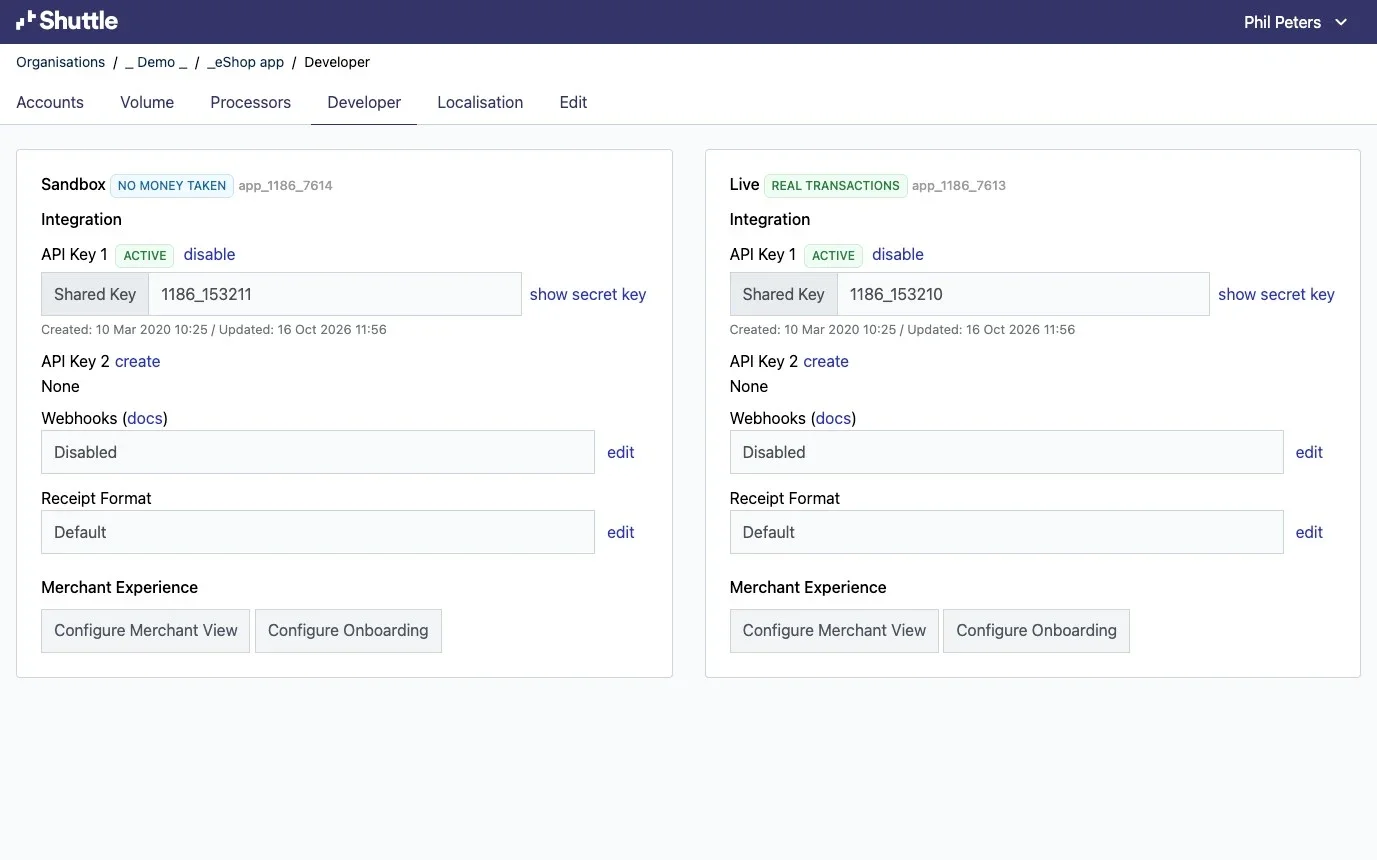
Section titled “Where to find your API keys”In the Shuttle portal, open your organisation, then your application, then Developer. Sandbox and Live are side by side.
Each key has a shared key, shown on the page, and a secret key, shown when you select show secret key. Requests use the secret key; the shared key only identifies it.
Keep secret keys on your server. Anyone with one can act on every merchant in that environment, so never put one in a browser, a mobile app or a code repository.
Sending your key
Section titled “Sending your key”Use HTTP Basic authentication with your secret key as the username and a blank password. Most HTTP clients do this for you:
curl -u "$SHUTTLE_SECRET_KEY:" \ "https://app.shuttleglobal.com/c/api/instances/M12345/transactions?limit=1"Note the colon after the key: it separates the username from the empty password. If you build the header yourself, Base64-encode the key followed by a colon:
const auth = Buffer.from(`${process.env.SHUTTLE_SECRET_KEY}:`).toString('base64')
const response = await fetch('https://app.shuttleglobal.com/c/api/instances/M12345/transactions?limit=1', {  headers: { Authorization: `Basic ${auth}` }})const { transactions, meta } = await response.json()
Choosing the merchant
Section titled “Choosing the merchant”Your key reaches all your instances, so each request says which merchant it is for: put the instance key in the path, /c/api/instances/{instance_key}/.... The instance key is the one you set when you created the instance, for example M12345:
POST https://app.shuttleglobal.com/c/api/instances/M12345/paymentsGET https://app.shuttleglobal.com/c/api/instances/M12345/accountsEvery endpoint in the Merchant Instance API works this way. The Platform API’s own endpoints, which manage the instances themselves, aren’t for one merchant: they go to https://app.shuttleglobal.com/c/api/instances with the same key.
Rotating your key
Section titled “Rotating your key”Each environment can hold a second key while you change over. Create API Key 2, move your integration to its secret key, then disable API Key 1.
When authentication fails
Section titled “When authentication fails”A request with a missing or invalid key gets a 401 response. Check that you are sending the secret key (not the shared key), that it is the key for the right environment, and that the URL includes the instance key.
Account sharing
Section titled “Account sharing”Shuttle can also let another platform work with your merchants’ accounts, with each merchant’s permission: for example, a property management system charging cards that your booking system collected. That uses OAuth and authenticates differently: see Account sharing.
Was this page helpful?
What went wrong?
Thanks for telling us.